Addon Preferences
Interface
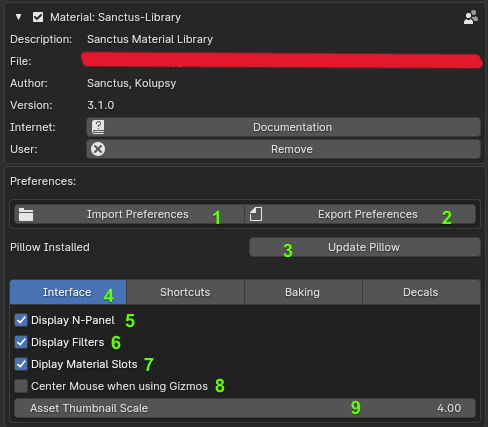
The Interface preferences control the general look and feel of the Sanctus Library within Blender.
| Setting | Description |
|---|---|
| Import Preferences | Imports previously saved addon preferences. |
| Export Preferences | Exports current preferences, including asset favorites. |
| Image Processor (Pillow) | When installed, this Python library significantly increases the loading speed of thumbnails. |
| Tabs | Allows you to navigate between different groups of preferences. |
| Display N-Panel | Toggle the visibility of the Sanctus Library tab in Blender's N-Panel. If disabled, use the Floating Panel shortcut instead. |
| Display Filters | Toggle the visibility of the filter options in the addon panel. |
| Display Material Slots | Toggle the visibility of material slots in the addon panel. |
| Center Mouse when using Gizmos | Automatically centers the mouse in the viewport when using gizmos such as those used by "Decals" and "Geometry Nodes assets". |
| Asset Thumbnail Scale | Adjusts the size of the thumbnails displayed in the addon panel. |
Shortcuts
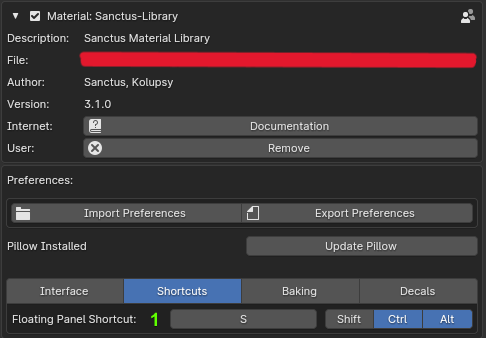
These settings define the keyboard shortcuts used to interact with Sanctus Library.
| Setting | Description |
|---|---|
| Floating Panel Shortcut | Defines a keyboard shortcut that will open a floating panel in the viewport. You can also use the N-Panel tab. |
Decals
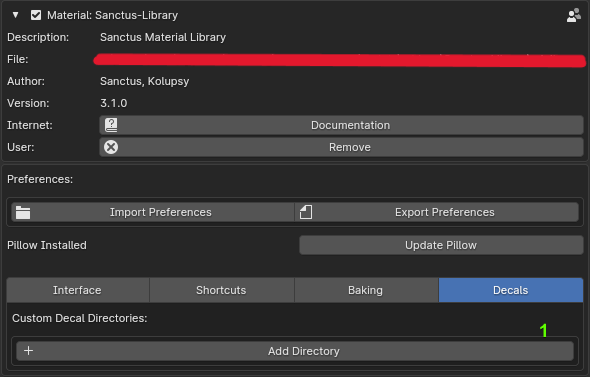
- Settings specific to Decal assets. How to add local folders as decal categories