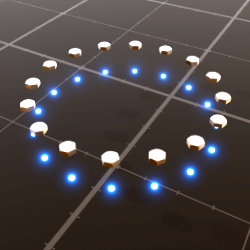
Polygonal Array
Technical Details
Asset Type: Geometry Nodes Asset
Usage
Select a MESH object and use the Place on Surface button in the Addon panel to place this asset on its surface.
Parameters
▼ ARRAY
Instances Collection: The collection where the objects to be instanced are
Target Object: Select the object where the array will be placed (This allows the particles projection, the alignment to the target face normals and the auto center on target face)
Project From: The distance from which the instances are projected, if some of the particles are below the target surface you may need to increase this value
Projection Distance: The distance instances will look for surface to be projected into. If a face is further away than this value, those particles won't be projected and will be removed
Project: Toggles between preview and projected states
Auto-center: The center of the array will be aligned to the target face center automatically, deactivate for manual placing
Radius: The radius of the array
Resolution: The resolution is the number of sides the polygon has
Density: The amount of instances per side (a resolution of 3 and a density of 10 will give you a 3 sided polygonal array with 30 instances)
Rotations: It basically opens the shape of the polygon creating an arc, a circle with a Rotations value of 0.5 will result in a semi-circular arc
Array Translation: move the array (same as doing it manually) it can help to make minor adjustments in the position. This is overridden when Auto-center is active, but it still moves the origin of the array so you may unintentionally target another face for the Auto-center
Array Rotation: Rotates the array around the local Z axis
▼ RECTANGLE
Activate: Switches from any other polygon to Rectangle
X Size: Size on X axis
Y Size: Size on Y axis
X Density: Amount of instances on X axis sides
Y Density: Amount of instances on Y axis sides
Set Y Relative to X: When active Y Density is overridden and calculated proportionally to X Density (While active you just have to adjust 1 value to manage density, deactivate to make manual adjustments)
▼ INSTANCES
Align Rotation to Target: While active the instances Z axis is aligned to closest face normal, deactivate if you need the instances rotation unaltered
Order by (index / random): Switch between Random and Indexed order for the instances in the polygonal array.
Scale: The scale of the instances
Scale Jitter: Increases the difference in scale of the instances
Rotation X: Rotates instances on local X axis
Random: When active it will rotate the instances on local X axis using "Rotation X" as the maximum possible rotation
Rotation Y: Rotates instances on local Y axis
Rotation Z: Rotates instances on local Z axis
Missing Instances: A factor to increasingly and randomly remove instances
Seed: Gives different results using the same parameters
User's Gallery
Have your render featured here!
Do you want to be featured? Submit a render using this asset to our Discord