Moss Normal
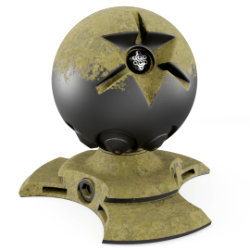
Parameters
Color Input: Color input
Metallic Input: Metallic Input
Roughness Input: Roughness Input
Normal Input: Normal Input
▼ MASK
Distance: Mask distance
Blend: Mask Blending
Fixed / Dynamic: Switches between Local and Global orientation of the mask
Strength: Mask Strength
▼ MASK NOISE
Scale: Mask noise scale
Detail: Mask noise detail
Roughness: Mask noise roughness
Factor: Mask noise factor
▼ TEXTURE
Scale: Dirt texture Scale
Detail: Dirt texture Detail
Seed: Gives different results using the same parameters
Bump: Dirt texture bump multiplier
▼ MOSS
Replace Color: replace the color in the affected areas
Color1: Color 1
Color2: Color 2
Replace Metallic: replace metalness in the affected areas
Metallic: Metallic
Replace Roughness: replace roughness in the affected areas
Reoughness: Controls the roughness of the noise used for the moss mask.
vector: An input where you can replace the default vector, you can for example plug a UV Map node with a Mapping node or any other texture coordinate.
Adjusting mapping and stretched textures
▼ REPLACE MASK
mask input: An input where you can plug an image texture or procedural mask to replace the areas where the effect is applied
replace: 0= Original mask, 1= Replace the mask with the one plugged in the "Mask Input"
User's Gallery
Have your render featured here!
Do you want to be featured? Submit a render using this asset to our Discord