Holo Tool
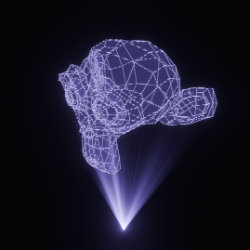
Technical Details
Asset Type: Geometry Nodes Asset
Usage
Select your MESH target object, use the Apply to Mesh button in the Addon panel to add this asset to your scene.
Parameters
Color: Hologram Color
Wire Radius: Object wire radius
Wire Emission: Object wire emission strength
Projector Light: Projector light strength
Projector Density: Projector density
Projector Position: Projector distance from object
Projector Distance: Projector light range
Projector Spread: Projector light spread
Projector Variation Speed: Animates projector light (0 to fix it)
Rotate X: Rotates the object along X axis
Rotate Y: Rotates the object along Y axis
Rotate Z: Rotates the object along Z axis
Rotation Speed: Rotation speed
Manual Rotation: Rotates the object manually (can be used to change the starting rotation or a fixed one when rotation speed is set to 0)
Scale: Overall Scale
User's Gallery
Have your render featured here!
Do you want to be featured? Submit a render using this asset to our Discord