Wood Fence E
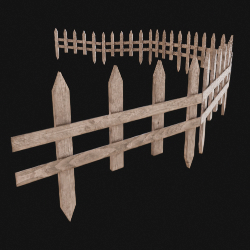
Technical Details
Asset Type: Geometry Nodes Asset
Usage
Select a target MESH object, use the Draw on Surface button in the Addon panel to draw this asset on its surface.
Parameters
Dynamic (need target): When active, it will adapt to the surface of the target object (if the terrain is too irregular it will not look realistic)
Target Object: Target terrain object when Dynamic parameter is active
Flip Side: Flip fence interior/exterior side
Color 1: Wood Color 1 (while using the default wood material)
Color 2: Wood Color 2 (while using the default wood material)
Wood Finish: Wood finish factor (while using the default wood material)
Planks Variation: Documentation in progress...
Seed: Documentation in progress...
▼ MODULES
Modules Length: Length of the panels/modules
Module Separation: Modules separation
Vertical Position: Adjust fence position vertically
▼ PLANKS
Planks Width: Documentation in progress...
Planks Depth: Documentation in progress...
Planks Number: Documentation in progress...
Planks Separation: Documentation in progress...
Planks Offset: Documentation in progress...
Planks Random: Documentation in progress...
▼ POSTS
Spacing: Plank spacing
Posts Height: Posts height
Posts Width: Posts width
Posts Depth: Posts depth
Tip Height: Post tip height
Spike Height: Spike total length
Spike Tip: Spike tip length
Material: Fence Material
Realize Instances: Activate this Only before applying the modifier to convert instances to mesh. (It may take some processing time)
User's Gallery
Have your render featured here!
Do you want to be featured? Submit a render using this asset to our Discord