Search and Filters
To facilitate finding specific materials, Sanctus Library provides several search and filtering options.
Navigation
Browse materials by category. Click on a category's preview thumbnail to view all materials within that category. Refer to Material Icons for quick identification of material properties.
Filters
Filters streamline the process of finding materials with specific attributes. You can filter materials based on:
- Render Engine
- Complexity
- UV requirements
- Displacement usage
Materials that do not meet your filter criteria will be hidden from the category listings. You can toggle the visibility of filters in the addon preferences.
Search
A search icon is located in the top right corner of the material preview thumbnail:
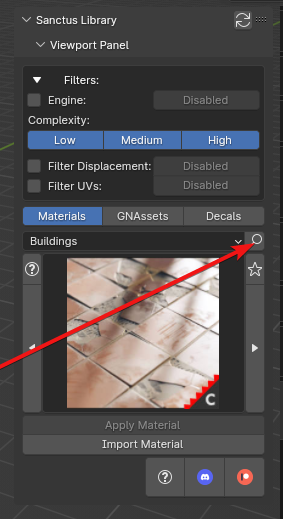
This function allows you to search through categories and material names. To initiate a search, enter your search term and it will be used as a filter. Matching materials will be displayed on a list, and you can click on a material's name to select it.