Stained Glass
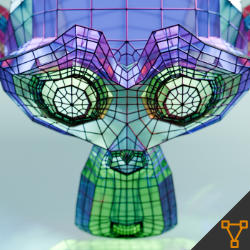
Technical Details
Asset Type: Geometry Nodes Asset
Usage
Select your MESH target object, use the Apply to Mesh button in the Addon panel to add this asset to your scene.
Parameters
Strips Material: The material used for the strips
Glass Material: The material used for the glass
▼ STRIPS
Strips Color: Color
Strips Metallic: Metallic
Strips Roughness: Roughness
Resolution: The amount of sides the strips have
Radius: Radius of strips
Shadow: Strips cast shadows
Shade Smooth: Shade Smooth control
▼ GLASS PROPERTIES
IOR: Glas IOR
Glass Light Through: The amount of light that goes through the glass
Glass Roughness: Glass Roughness
Caustics Offset: Offsets the caustics
Caustics Strength: Caustics strength
Glass Bump: Controls Glass bump
Bump Scale: Bump texture scale
▼ PATTERN COLOR
Number of Colors: Amount of different colors used (Affects all 3 pattern methods)
Seed: Gives different results using the same parameters
▼ PATTERN METHOD
Area|Index|Random: Picks from 3 different color pattern methods
▼ AREA
Tolerance: How much difference in area surface will be tolerated before assigning a different color to a face. 0 tolerance will only assign the same color if the areas are exactly the same, 1 tolerance will tolerate any size change making all the faces the same color. (The "Number of Colors" parameter also limits how many different colors will be assigned)
▼ INDEX
Mirror Axis (X,Y,Z): Selects the axis for the mirroring
Group Size: How many consecutive index numbers will have the same color before changing to another
▼ GEOMETRY
Subdivision Level: Number of subdivisions
Edge Crease: Edge Crease
Realize Instances: Activate this Only before applying the modifier to convert instances to mesh. (It may take some processing time)
User's Gallery
Have your render featured here!
Do you want to be featured? Submit a render using this asset to our Discord