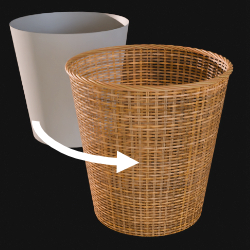
Wicker D
Technical Details
Asset Type: Geometry Nodes Asset
Usage
Select your MESH target object, use the Apply to Mesh button in the Addon panel to add this asset to your scene.
Parameters
Border: Activates border (works with open mesh bounds)
Border Color 1: Border color 1 (while using the default material)
Border Color 2: Border color 2 (while using the default material)
Twist Factor: Border twist factor
Number: Number of threads in the border
Radius: Border threads radius
Resolution: Border resolution
Border Material: Default border material
Wicker Material: Default Wicker Material (To edit the wicker material parameters, while selecting the object go to the shading tab and select the assigned material. By default "wicker_texture_a")
Realize Instances: Activate this Only before applying the modifier to convert instances to mesh. (It may take some processing time)
User's Gallery
Have your render featured here!
Do you want to be featured? Submit a render using this asset to our Discord