Changelog / Updates
v3.0 - May 14, 2024
Materials
New:
Embroidery - Fabrics (1)
Neoprene - Fabrics (4)
Pavonazzetto Marble - Stones (4)
Generic Marble - Stones (4)
Car Metallic Paint - Synthetics (4)
Marble Tiles - Buildings (4)
Machined Metal - Metals (1)
Rail Metal - Metals (1)
Galvanized Metal - Metals (1)
Brick Wall - Buildings (4)
Updated/Fixed:
-Wood planks - Wood - Exposed Knots individual X, Y, Z scale to control aspect ratio.
-Disintegrate - effects - Added effect direction control.
-Asphalt - Improved line controls - added brightness control - Added road direction and mapping controls
-Ceramic Hex Tiles - Improved Roughness Map - Added Grime Parameter
-Sky Shader add rotation, fix parameters.
-Old Wood Planks - Buildings - Improved performance
-Surface - Buildings - Improved performance
-Alien Skin - Organic - Improved Subsurface and Performance
-Smart Metal Materials - Dents were not affected by the replace vector socket, now they do.
-Mixed Tri Hex Tiles 04 - Fixed metadata from No uv required to UV Required
GN Tools
Functionality:
Until now each Generator required the user to manually repeat several steps like going to the modifier to select a target object, add a curve and enter edit mode to select the curve drawing tool and memorize different steps for each asset. Now these steps are done automatically. To solve this, multiple ways to apply or use the generators where added. Assets will have one or more of these options available depending on their type.
-Add new: Adds the asset as a new object to the scene. (In most cases a stand alone object that won't interact with any other object)
-Apply to Mesh: Applies the asset to the selected object. (for cases like converting an existing object to bricks, voxels or clouds)
-Apply to Curve: Applies the asset to the selected curve. (Can be used on an existing curve to convert it to barbed wire or a cable)
-Free Draw: Draws a curve with the asset. (adds a new curve with a generator and let's you start drawing it, can be used with flowers, vines, cables, ropes)
-Draw on Surface: Draws a curve on a target objects surface, object gets parented to the target. (Ideal for moss, vines, grass, mushrooms and more)
-Place on Target: Place a generator on the surface of a target object and aligns it to the targeted face normals. The object is also parented to the target. (Useful for tools like the Polygonal Array, screws, nails, buttons, HUDs and many elements that can get attached to another object)
New Assets:
Polygonal Array - Tools
Array on Curve - Tools
Planks Flooring - Buildings
3D Label - Tools
Eyes - others
Snow Trail - Nature
Neon Sign - Buildings
Domino - Others
Modified/Fixed:
-Circular Array - Old circular array tool was removed and replaced with the new Polygonal Array
-Array Path - Completely reworked, added trim, offset position in curve, and other parameters - Renamed to Array on Curve
-Cable on surface - Ropes and Cables - Now support multiple objects (collection) as a target to align the end points of the cables to
-Turntables - Tools - Using Object and Generated Coordinates based materials no longer have their textures fixed in place while the object is animated
-Weld Me - Others - Material & geometry preview speed was significantly improved
Decal Tool
-Decals now support UV mirroring when working with Mirror Modifier and mirrored Decals also get baked
-Decals can now be repositioned (a more simple and accurate way to move them) with a new button "Reposition Decal".
-Added offset from surface parameter.
-The parameter "Backface removed" is now active by default (works better in almost every case)
-Decal Tool is now available on Sanctus Library Lite 3.0 version with a limited amount of decals.
Addon
New:
-The UI for the assets parameters was improved to be easier to read
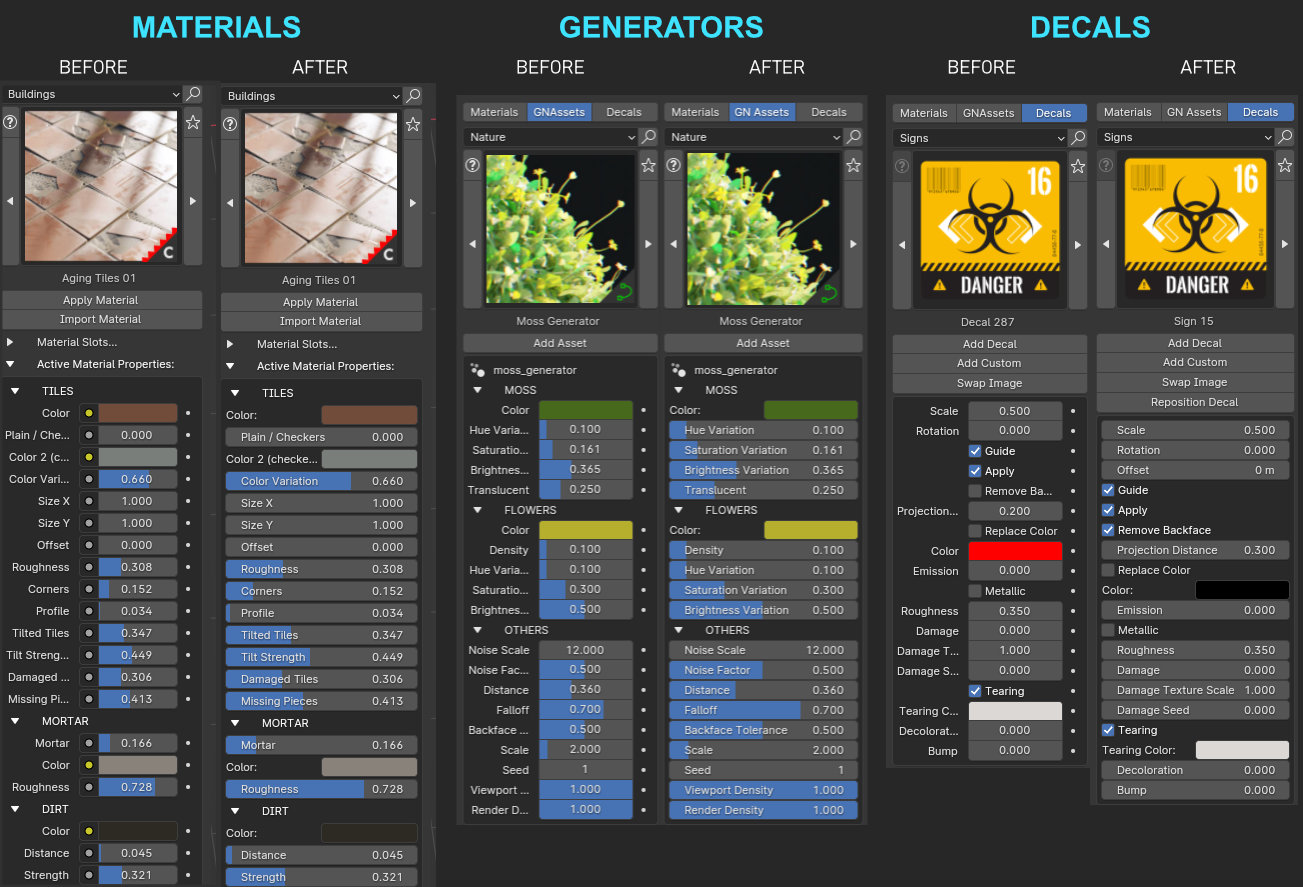
Updated/Fixed:
-Compatibility with Blender 4.1
-Custom Bake resolution now supports non-square ratio. When you select custom resolution you will be able to set a different value for W and H if needed.
-There are now no restrictions to the type of objects that we can apply materials to. Before it was restricted to mesh and curve, now you can use it on metaballs for example.
-If you start or load a new file without closing Blender your asset filters settings will not reset.
-Fixed an issue where Sanctus Library panel search result was empty after starting a new file in blender without restarting.
-Fixed an error that occurred when deleting bake results one by one, after the last item was deleted.
-Fixed an error when after applying an asset filter and loading or starting a new file without closing blender, the asset list was empty.
-Fixed an error when baking 2 nodes socket outputs with the same name. Now the duplicates will be automatically renamed with a suffix.