Plank Surface
Technical Details
Asset Type: Geometry Nodes Asset
Usage
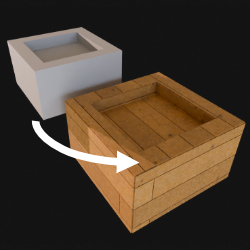
Select your MESH target object, use the Apply to Mesh button in the Addon panel to add this asset to your scene.
Parameters
Color 1: Wood Color 1 (while using default material)
Color 2: Wood Color 2 (while using default material)
Plank Variation: Documentation in progress...
Wood Finish: Wood finish (while using default material)
Seed: Documentation in progress...
▼ PLANKS SIZE
Planks Width: Planks width
Planks Length: Planks Length
Planks Height: Planks Depth/Height
Rotate Planks: Rotates planks in 45º steps
Material: Default Material Used in Planks (Only visible in Modifier's Tab)
▼ PLANKS POSITION
Planks Separation: Separation between each plank
Panels Separation: Separation between each panel of planks (panels are divided by angle)
Offset Rows: Offset every other row
Random Offset: Documentation in progress...
X Offset Floor: Documentation in progress...
Y Offset Floor: Documentation in progress...
Auto Align Planks: Attempts to align planks so they match even when they are in different panels
Realize Instances: Activate this Only before applying the modifier to convert instances to mesh. (It may take some processing time)
User's Gallery
Have your render featured here!
Do you want to be featured? Submit a render using this asset to our Discord