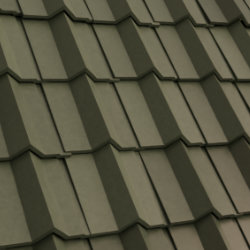
Auto Roof Sharp Tiles
Technical Details
Asset Type: Geometry Nodes Asset
Usage
Select your MESH target object, use the Apply to Mesh button in the Addon panel to add this asset to your scene.
Parameters
Failsafe: Activates and Disables the failsafe
Limit: If the target object has more than these amount faces the generator will not execute
▼ TILES
Collection: The collection used for the tiles
H Spacing: Horizontal separation between each placement of a tile (Don't adjust if you don't change the tile object since it is set to match the generators default tile)
V spacing: Vertical separation between each placement of a tile (Don't adjust if you don't change the tile object since it is set to match the generators default tile)
▼ TILES POSITION
Offset Rows: Offset every other row
H Offset: Horizontal tiles offset
V Offset: Vertical tiles offset
Random V offset: Adds random vertical offset per tile (can produce overlapping depending on the parameter intensity and the tile geometry)
Probability: The ratio of tiles affected by the random vertical offset
Random V Rotation: Adds random vertical rotation per tile (can produce overlapping depending on the parameter intensity and the tile geometry)
Probability: The ratio of tiles affected by the random vertical offset
Random H Rotation: Adds random horizontal rotation per tile (can produce overlapping depending on the parameter intensity and the tile geometry)
Probability: The ratio of tiles affected by the random vertical offset
Auto Align Tiles: Align tiles from opposite sides of the roof (horizontally and vertically)
Cut: Tiles in the edge of the roof will be cut by one of the 2 methods by projecting the roof along the Normal or "along the Z axis
Method: The method used to cut the tiles Fast works in most cases, if you find missing tiles you can either slightly alter the mesh or try the Precise** method
▼ RIDGE TILES
Collection: The collection used for the tiles
Spacing: Horizontal separation between each placement of a tile (Don't adjust if you don't change the tile object since it is set to match the generators default tile)
Offset Level Tiles: Offsets level ridge tiles along edge normal (used to minimize overlapping)
Offset Slope Tiles: Offsets slope ridge tiles along edge normal (used to minimize overlapping)
▼ TILES MATERIAL
Replace Material: Replace original tiles material from the objects in the collection (uncheck to use the original material of each tile in the collection)
Material: Replace original tiles material from the objects in the collection (uncheck to use the original material of each tile in the collection)
Tile Color: Tiles main color (if Replace Material is active)
Tile Variation: Color variation per tile (if Replace Material is active)
Tile Roughness: Tiles roughness (if Replace Material is active)
▼ FOLIAGE
Active: Activates Foliage
Replace Material: Replace original tiles material from the objects in the collection (uncheck to use the original material of each tile in the collection)
Material: Replace original tiles material from the objects in the collection (uncheck to use the original material of each tile in the collection)
Collection: The collection used for the tiles
Preview Mode: Preview mode show simplified and less instances to speed up the viewport (renders won't be affected)
Distribution: There are 3 foliage distribution methods (All Edges: concentrates foliage in the roof edges, Only Concave: Concentrates foliage in the concave edges of the roof, Bottom + Concave: Concentrates foliage in the bottom and concave edges of the roof
Density: Maximum density
Min Density: Minimum density for an affected region (if not at 0 there will always be at least this value of density affecting the entire roof)
Distance From Edges: How far from the edges the foliage will be distributed
Vertical Mask: A mask that will gradually remove foliage starting on the top of the roof
Build Up: Adds some volume and stacks foliage on top of each other to generate some build up close to concave edges
Mask Noise: Adds noise for a more natural distribution without straight mask edges
Instance Probability: In the default collection there are leaves and grass blades, this parameter controls the balance between them
Ridge Mask: Gradually removes foliage close to the ridges
▼ OTHERS
Realize Instances: Realize all instances (activate before applying the modifier)
Seed: Gives different results using the same parameters
User's Gallery
Have your render featured here!
Do you want to be featured? Submit a render using this asset to our Discord